
Screenshots
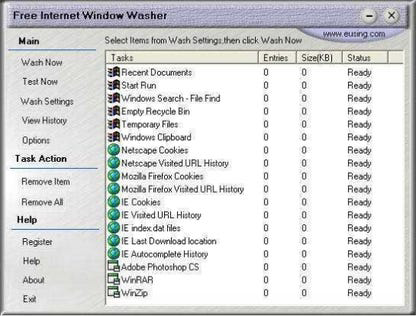


App details
- Updated
- April 3, 2019
- Requires
- Windows 2003, Windows Vista, Windows 98,...
- Developer
- Eusing Software
- Category
- Mobile
SoftPas in:
This product is also available in the following languages:
About Free Internet Window Washer
Download Free Internet Window Washer – internet privacy, browsing history cleaner, online security, secure browsing, privacy tool
Overview
Free Internet Window Washer is a productivity-focused tool designed to assist users in maintaining browsing privacy by cleaning temporary internet files and related data. Positioned within the online security category, the application aims to support users who wish to prevent tracking, reduce digital footprints, and enhance privacy during web browsing. It is intended for individuals seeking a straightforward method to manage their browsing history and cached data across multiple web browsers.
The app supports a range of popular browsers, including Internet Explorer, Netscape, Opera, and Firefox, which indicates an effort to provide cross-browser compatibility. This functionality allows users to perform cleanup tasks without switching between different tools. Real-world use cases include users who share computers, individuals concerned about online surveillance, or those who want to maintain a clean browsing environment for improved performance and privacy.
Although the developer did not provide additional background on their organization or development history, the app is presented as a free utility with no upfront cost. Its release on May 20, 2024, marks a recent entry into the privacy tool ecosystem. Despite its intentions, user feedback and performance observations suggest inconsistencies that may affect reliability, particularly in clearing browsing history as expected.
Key Features & Functionality
- Multi-Browser Cleaning Support – The application enables users to clean temporary files and browsing data from Internet Explorer, Netscape, Opera, and Firefox. This feature allows for centralized management of privacy settings across different browser environments.
- Customizable Wash Settings – Users can access the Wash Settings menu to select specific types of data to remove, such as cookies, cache, temporary internet files, and history entries. This level of control helps tailor the cleanup process to individual privacy preferences.
- Scheduled Cleaning Tasks – The app allows users to automate cleanup operations using preset intervals. This functionality is beneficial for users who want to maintain consistent privacy hygiene without manual intervention.
- Real-Time Item Counter – A counter at the bottom of the interface displays the estimated number of items and disk space to be cleaned. While this provides immediate feedback, actual performance has shown discrepancies between displayed and real results.
- Simple Interface Design – The app features a minimal layout with basic navigation elements. Though not visually engaging, the interface is straightforward, making it accessible for users unfamiliar with technical tools.
These features collectively aim to streamline the process of managing digital traces. For example, a user working in a shared office environment could schedule daily cleanups to prevent others from accessing their browsing history. Similarly, someone using a public computer might use the app to clear data immediately after browsing.
Interface, UX & Performance
The user interface of Free Internet Window Washer is described as plain and monotonous, with limited visual appeal. Despite its simplicity, the layout lacks intuitive navigation, particularly due to the non-logical arrangement of commands on the left side of the interface. This can lead to confusion and inefficiency, especially for first-time users trying to locate specific functions.
Navigation flow is hindered by inconsistent design patterns, making it difficult to predict where to go next. While the core functions are accessible, the absence of clear visual cues or progressive guidance reduces overall usability. The app’s responsiveness appears to vary, with some users reporting delays or incomplete execution of cleanup tasks.
Although the developer did not list formal performance metrics, observations indicate that certain features—such as clearing browsing history in Internet Explorer—did not function as expected. The counter displaying cleaned items also showed inaccuracies when compared to actual disk usage changes. These inconsistencies raise concerns about the reliability of the app’s core operations.
Stability during execution remains questionable, with occasional freezes or unresponsiveness noted during cleanup cycles. Users should be aware that while the app may clear temporary files and the Recycle Bin successfully, critical privacy functions may not execute consistently.
Platform Compatibility & Technical Requirements
Free Internet Window Washer is designed for the Windows operating system. The application has a file size of 2.5 MB, which suggests a lightweight footprint and minimal storage impact. It is available in version 1.0.0, indicating a stable initial release.
Specific system requirements were not listed, so compatibility with different Windows versions cannot be confirmed. The developer did not specify minimum OS requirements, nor did they provide details on hardware or memory needs. Users should exercise caution when installing on older or less powerful systems without verifying system compatibility.
As the app is free and distributed without restrictions, it can be installed on any Windows device that supports standard executable files. However, users are advised to ensure their systems are updated and protected with current antivirus software before installation.
Pros and Cons
Pros
- Free to download and use with no hidden costs.
- Supports multiple web browsers including Internet Explorer, Firefox, Opera, and Netscape.
- Offers customizable cleaning settings for targeted data removal.
- Includes automated cleaning schedules for consistent privacy maintenance.
- Minimal file size reduces storage impact on the device.
Cons
- Interface lacks intuitive navigation and logical flow.
- Performance tracking counter is inaccurate compared to actual results.
- Some core functions, such as clearing browsing history, may not work reliably.
- Stability issues reported during cleanup operations.
- Developer did not provide detailed technical specifications or system requirements.
FAQ
Is Free Internet Window Washer safe to install?
The app is free and distributed without apparent malware, but users should ensure they download it from a trusted source. As with any third-party tool, it’s recommended to scan the file with up-to-date antivirus software before installation.
Can I use this app on my current Windows version?
Compatibility depends on your system’s configuration. Since the developer did not specify minimum OS requirements, users are advised to test the app on their device or check for updates from the official source.
Does the app clean browsing history across all browsers?
The app supports cleaning history for Internet Explorer, Firefox, Opera, and Netscape. However, real-world testing has shown inconsistent results, particularly with Internet Explorer history clearance.
How often can I schedule cleanups?
The app allows users to set cleaning tasks using preset increments. The exact frequency options were not detailed, but users can likely choose from daily, weekly, or custom intervals.
Is there a mobile version available?
Based on current information, Free Internet Window Washer is only available for Windows. There is no official mobile version for Android or iOS at this time.
Final Thoughts
Free Internet Window Washer presents a conceptually sound approach to browsing privacy, offering multi-browser support, automation, and a lightweight design. However, its execution falls short due to a poorly structured interface, inconsistent performance, and unreliable feedback mechanisms. While it may serve as a basic tool for users with minimal privacy needs, more robust and dependable alternatives are available in the market.
For individuals seeking a secure, accurate, and user-friendly privacy solution, this app may not meet expectations. Nevertheless, its free nature and small size make it a low-risk option for testing basic cleanup functions. If your priority is reliable privacy management, consider exploring more established tools with verified performance records.
Download Free Internet Window Washer now
Guides & Tutorials
How to install Free Internet Window Washer
- Click the Download button above.
- Once redirected, accept the terms and click Install.
- Wait for the Free Internet Window Washer download to finish on your device.
How to use Free Internet Window Washer
This software is primarily used for its core features described above. Open the app after installation to explore its capabilities.
User Reviews
No reviews yet. Be the first to share your experience.
You may also like
more
Que no te pillen¡
About !Que no te pillen¡Reviewed by Jason A. BilbreyShow MoreShow Less

3D Combat Zone
About 3D Combat ZoneOriginally released in 1983, 3D Combat Zone immerses players...

666: El día del portal
About 666: El día del portalOn June 6, 2006, Agent P. Stone uncovers a sinister...

80 in 1 Best Flash games
About 80 in 1 Best Flash games 80 in 1 Best Flash games is a collection of 80 fl...

ABYSS SEEKERーーWhat Do You See Deep in The Abyss
About ABYSS SEEKERーーWhat Do You See Deep in The AbyssIn ABYSS SEEKER, players...

ACA NEOGEO THE KING OF FIGHTERS 2002 for Windows
About ACA NEOGEO THE KING OF FIGHTERS 2002 for WindowsTHE KING OF FIGHTERS 2002,...